 listicle
Best Smart Home Integration Devices 2026
Table of Contents
- Why Smart Home Integration Matters More Than the Gadgets
- Quick Comparison: Top Smart Home Integration Devices
- Matter-Compatible Smart Home Hubs: The Interoperability Standard
- Voice Assistants and Displays: Your Command Center
- Beyond the Hub: Locks, Thermostats, and Plugs
- How to Set Up Smart Home Integration Without the Headaches
- Troubleshooting Smart Home Connectivity Issues
- Which Integration Setup Is Right for You?
- Frequently Asked Questions
Last Updated: September 6, 2026
The most common smart home mistake isn't buying the wrong gadget; it's buying gadgets that refuse to talk to each other. A smart home integration strategy is the connective tissue that lets a $20 plug, a $250 thermostat, and a $50 doorbell work as one system. This guide from NovexaTech LLC breaks down the best smart home integration devices 2026 has to offer, focusing on interoperability, security, and setups that won't leave you troubleshooting at midnight.
Why Smart Home Integration Matters More Than the Gadgets
Interoperability is the difference between a collection of gadgets and a functional smart home. When devices share a common protocol like Matter or Thread, automations run locally with lower latency, and you avoid juggling five apps just to turn off the lights. The real value emerges when a single "Goodnight" routine locks the front door, dims the lights, and adjusts the thermostat simultaneously.
The industry has recognized this pain point. The Connectivity Standards Alliance developed Matter to create a unified standard that works across Amazon, Apple, Google, and Samsung ecosystems. According to the Connectivity Standards Alliance's Matter specification, this protocol reduces the friction of device setup and ensures cross-platform compatibility. In practice, this means the days of checking a box for "Works with Alexa" versus "Works with Google" are fading, but only if you choose devices that support these modern standards from the start.
Quick Comparison: Top Smart Home Integration Devices
Choosing the right gear depends on your existing ecosystem and your tolerance for configuration. The table below summarizes the leading options for 2026, balancing protocol support, voice assistant integration, and price.
| Device | Starting Price | Protocols Supported | Best For | Standout Feature |
|---|---|---|---|---|
| Amazon Echo Show 8 | $149.99 | Zigbee, Matter, Thread | Wide device compatibility | Built-in smart home hub |
| Google Nest Hub Max | $229.00 | Matter | Google ecosystem users | 10-inch display with camera |
| Apple HomePod | $299.00 | Thread, Matter | Apple users prioritizing privacy | Superior audio quality |
| Amazon Echo Dot (5th Gen) | $49.99 | Matter, Wi-Fi | Budget voice control | Built-in temperature sensor |
| Schlage Encode Deadbolt | $249.00 | Wi-Fi | Secure entry | No hub required |
| Google Nest Learning Thermostat | $249.99 | Matter | Energy savings | Auto-schedule learning |
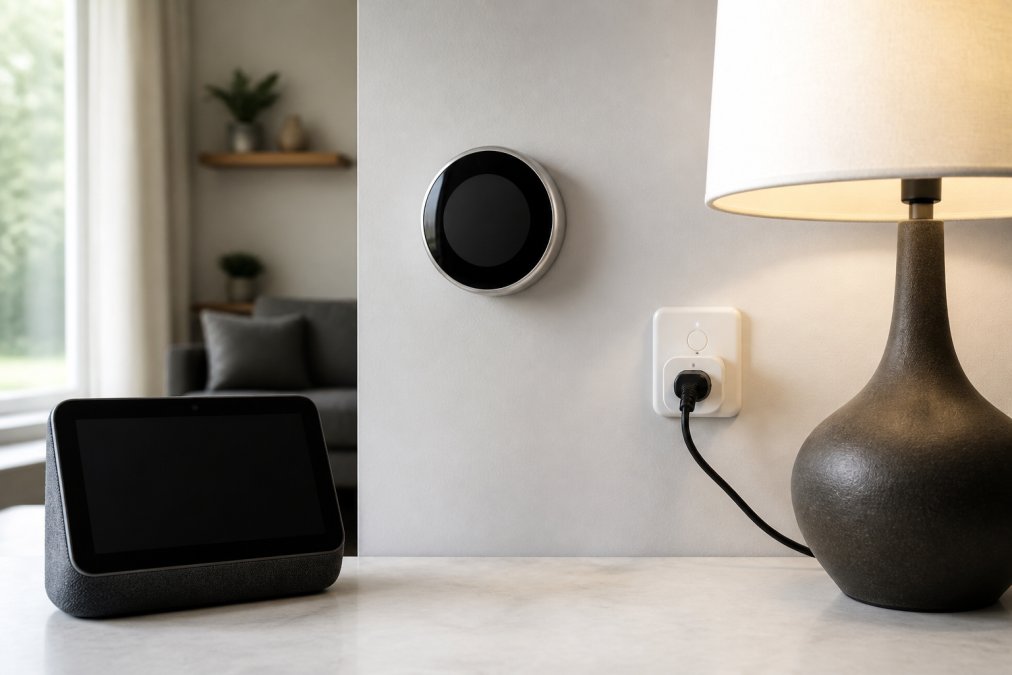
For most households, the Amazon Echo Show 8 offers the best balance of cost and capability, supporting Matter, Thread, and Zigbee natively. Apple users should lean toward the HomePod for encrypted data handling, while budget-conscious buyers can start with the Echo Dot and expand later.
Matter-Compatible Smart Home Hubs: The Interoperability Standard
Matter-compatible smart home hubs are the backbone of a future-proof setup, translating between protocols so a Zigbee sensor can trigger a Wi-Fi camera or a Thread lock can communicate with a cloud-based assistant. The Echo Show 8 stands out with Zigbee and Thread radios built in.
When evaluating a hub, consider whether it supports local control versus cloud-dependent operations. Local control means your automations continue working even if your internet drops, which matters for security devices like locks and cameras. Cloud-based control offers remote access but introduces latency and a dependency on the manufacturer's server uptime. The Thread Group's technical overview explains how Thread creates a self-healing mesh network that improves reliability and reduces the need for a central hub to manage every command.
Voice Assistants and Displays: Your Command Center
Voice assistants are the user interface for your smart home integration, turning complex routines into simple spoken commands. The Google Nest Hub Max excels at voice recognition with a visual dashboard. The Apple HomePod prioritizes privacy with on-device Siri processing, though it limits functionality for non-Apple users.
A common mistake is assuming all voice assistants handle multi-step commands equally well. Google Assistant handles natural language more flexibly, while Alexa benefits from a larger catalog of third-party "skills." The Echo Show 8's broad compatibility reduces the chance you'll end up with another gadget that won't connect.
Beyond the Hub: Locks, Thermostats, and Plugs
Hubs and displays get the attention, but peripherals do the actual work. Each category has its own protocol quirks, power requirements, and security trade-offs.
Smart Locks: Security vs. Convenience Trade-offs
The Schlage Encode Smart WiFi Deadbolt remains a strong pick with built-in Wi-Fi, eliminating the need for a separate hub. Its built-in alarm and fingerprint-resistant touchscreen add physical security. However, Wi-Fi-only locks draw more power, requiring battery replacement every 3 to 6 months versus 12 to 18 months for a Z-Wave lock like the Yale Assure Lock 2.
A key consideration: the Schlage Encode does not natively support Matter, so it won't appear in Matter-based routines without a bridge. If Matter compatibility is non-negotiable, the August Wi-Fi Smart Lock (4th Gen) supports Matter over Wi-Fi but requires a separate Connect bridge for reliable remote access, adding $79.99. For Apple HomeKit users, the Level Lock+ uses Thread and integrates directly without a bridge, but lacks a built-in keypad, requiring a separate $79.00 Level Keypad accessory.
Before purchasing a lock, verify Matter support, battery type, and the manufacturer's firmware update policy. A lock that stops receiving security patches after 18 months is a liability, not a convenience.
Thermostats: Energy Savings Are Not Automatic
The Google Nest Learning Thermostat remains a top pick for auto-scheduling, but savings claims assume you actually use the schedule. The device studies your habits for the first week, then builds a program. If you override it frequently, the schedule stops adapting.
The Ecobee Smart Thermostat Premium ($249.99) includes a remote sensor in the box, balancing temperatures across rooms. The Ecobee supports Matter over Thread, whereas the Nest Learning Thermostat requires a separate Matter bridge for cross-platform automations.
Both units require a C-wire for consistent power in most homes. If your system lacks a C-wire, the Nest includes a power adapter, while Ecobee sells one separately for $29.99. Check your furnace's control board for a spare C-terminal before buying.
Smart Plugs: The Entry Point with Hidden Costs
The TP-Link Kasa Smart Plug Mini (HS103) is a common budget pick at $17.99, but lacks energy monitoring. The Kasa KP115 adds energy monitoring for $24.99, letting you track per-device consumption. The difference matters if you want to calculate the actual cost of running a space heater, dehumidifier, or old refrigerator.
For Matter-native options, the Eve Energy Smart Plug ($39.95) supports Thread and Matter, responding faster and working locally if your internet drops. The trade-off is price: more than double the Kasa for the same basic function. The Wyze Plug (4th Gen) at $14.99 supports Matter over Wi-Fi but requires a Wyze account and doesn't expose energy data to third-party apps.
Use smart plugs for devices you want to schedule or voice-control, not for always-on appliances like routers or modems. If you plug a router into a smart plug and accidentally turn it off via a routine, you lose network access to every other smart device. Keep network infrastructure on a dedicated, non-smart outlet.
Selecting Peripherals by Protocol, Not Brand
Across all three categories, the single most important selection criterion is protocol alignment with your hub. If you run an Amazon Echo Show 8 with built-in Zigbee and Thread, prioritize Zigbee or Thread peripherals over Wi-Fi-only models. If you run a Google Nest Hub Max, which lacks Zigbee, you'll need a separate bridge, factor that $30 to $80 cost into your budget.
A common pattern is buying a mix of Wi-Fi, Zigbee, and Thread devices without checking hub compatibility, then wondering why some respond instantly while others take 3 to 5 seconds. The latency difference is usually protocol-related, not a hardware defect. Standardize on one secondary protocol (Zigbee or Thread) for battery-powered sensors and locks, and reserve Wi-Fi for high-bandwidth devices like cameras and displays.
How to Set Up Smart Home Integration Without the Headaches
Most setup guides tell you to plug things in and scan a QR code. The reality is that smart home setup fails most often at the network layer, not the device layer. This section walks through a sequence that prevents common failure modes.
Phase 1: Prepare Your Network Before Unboxing Anything
The single biggest setup mistake is adding devices to a congested or misconfigured network. Before unboxing your hub, do three things:
- Separate your Wi-Fi bands. Many IoT devices only support 2.4 GHz Wi-Fi, but most modern routers broadcast a single SSID that combines 2.4 GHz and 5 GHz. When a device tries to connect, the router may push it to 5 GHz, which the device cannot use, causing an endless "device not found" loop. Log into your router's admin panel and create a dedicated 2.4 GHz SSID (e.g., "HomeIoT") with a separate password. Connect all smart home devices to this network.
- Disable band steering and AP isolation. Band steering actively pushes devices to 5 GHz, which breaks 2.4 GHz-only devices. AP isolation prevents devices from communicating with each other on the same network, which is exactly what your smart home needs to do. Turn both off for the IoT SSID.
- Check your router's device limit. Consumer routers typically handle 20 to 50 simultaneous connections. If you plan to exceed 30 devices, upgrade to a mesh system like the Eero Pro 6E or the TP-Link Deco XE75, which handle 100+ devices without degrading performance.
Phase 2: Hub First, Then Peripherals, One at a Time
Your hub or voice assistant is the controller for everything else, so it must be fully configured before adding peripherals.
- Unbox and power your hub, then complete its firmware update before adding any peripherals. A hub running outdated firmware may reject newer Matter devices or fail to negotiate Thread credentials correctly.
- Connect the hub to your dedicated 2.4 GHz IoT SSID, not the combined SSID. This prevents the hub from dropping to 5 GHz and losing contact with peripherals that only support 2.4 GHz.
- Add devices one at a time through the hub's companion app, using the Matter QR code when available. Do not add multiple devices simultaneously, if one fails to pair, the error is harder to isolate.
- Name each device by location (e.g., "Living Room Lamp") rather than by type, which makes voice commands more intuitive and prevents duplicate-name conflicts.
- After each device pairs, test it immediately with a voice command or app toggle before moving to the next device. This isolates pairing failures to the device you just added.
- Enable two-factor authentication on your hub account before enabling remote access.
Phase 3: When Devices Refuse to Cooperate
Even with perfect preparation, you will eventually hit a device that will not pair or drops offline repeatedly. Here is a diagnostic sequence that resolves most conflicts:
Symptom: Device pairs but does not respond to automations. Check whether the device is connected to the same protocol as your hub. If you have a Zigbee device and your hub only supports Matter over Thread, the device may pair through a bridge but will not appear in Matter-based routines. Remove the device, check the hub's supported protocols, and re-pair through the correct bridge.
Symptom: Device drops offline every few hours. This is almost always a power issue, not a network issue. Battery-powered devices that drop offline are usually in a low-power sleep state that the hub cannot wake. Check the battery level first. If the battery is fine, the device may be too far from the hub or router, move it closer or add a Thread border router or Zigbee range extender.
Symptom: Two devices from the same brand conflict with each other. Some manufacturers ship devices with overlapping default names (e.g., two "Smart Plug" entries). Rename both devices in the app, then remove and re-add them to the hub. If the conflict persists, check for a firmware update for both devices.
Symptom: Voice commands work for one assistant but not another. If you have both Alexa and Google Assistant enabled, a device may be linked to only one account. Open the device's native app, check the "Linked Accounts" or "Integrations" section, and ensure the device is authorized for both assistants. Some devices only support one assistant at a time, check the manufacturer's documentation before assuming a bug.
Symptom: A routine runs partially, then stops. Routines fail when one device in the sequence times out. If your "Goodnight" routine turns off the lights but does not lock the door, the lock likely timed out because it was in a low-power sleep state. Add a 2-second delay between routine steps in the hub's app, or wake the device manually before running the routine.
Phase 4: Document Your Setup
Most users skip this step, but it pays off during troubleshooting. After your setup is stable, write down:
- Your IoT SSID name and which devices are connected to it
- Each device's protocol (Wi-Fi, Zigbee, Thread, Matter)
- The firmware version of your hub and each critical device
- The date you last updated each device's firmware
This documentation turns a 30-minute troubleshooting session into a 5-minute check.
Troubleshooting Smart Home Connectivity Issues
When a device drops offline, the problem is usually the network, not the gadget. Start by checking your router's placement; a central location minimizes dead zones. If you have multiple smart devices, consider upgrading to a mesh network router to handle the increased load.
Latency and responsiveness issues frequently trace back to protocol conflicts. If you have both Zigbee and Thread devices, ensure they're connected to the correct hub or bridge, as mixing them without translation causes intermittent failures. A hard reboot of the hub, followed by re-pairing the affected device, resolves most persistent issues.
Which Integration Setup Is Right for You?
Your choice comes down to ecosystem loyalty and privacy tolerance. Apple users who value encrypted data and seamless device handoff should build around the HomePod. Users who want maximum device choice and frequent updates will find the Amazon ecosystem more flexible, with the Echo Show 8 acting as a reliable hub. Google's Nest Hub Max appeals to those who prefer its assistant's search capabilities and visual interface.
For those overwhelmed by options, the Consumer Reports' guide to smart home platforms recommends starting small: one hub, one plug, and one sensor. This approach lets you learn the configuration process before scaling up. NovexaTech LLC offers a curated selection of premium smart home devices.
Building a smart home that works reliably requires planning around interoperability and security, not just picking the flashiest gadgets. Start with a Matter-compatible hub, layer in voice control, and expand with peripherals that share your chosen protocol. For a curated selection of devices, explore the smart home collection at NovexaTech LLC.
Frequently Asked Questions
Which smart home hub offers the best cross-platform integration in 2026?
The Amazon Echo Show 8 currently leads for cross-platform flexibility thanks to its built-in support for Zigbee, Matter, and Thread protocols. This lets it control devices from Google, Amazon, and other brands without needing separate bridges. If you live inside the Apple ecosystem, the HomePod offers tighter, more private integration with HomeKit, but it limits compatibility with non-Apple gear.
What is the role of Matter in 2026 smart home integration?
Matter is the interoperability standard that lets devices from different brands talk to each other locally, without relying on cloud bridges. In 2026, buying Matter-compatible devices means your smart lock from one company will work with your hub and voice assistant from another. It reduces setup friction and makes your system more resilient when internet service drops.
How do I choose the right smart home integration device for my needs?
Start by listing the brands you already own. If you use Google services daily, a Google Nest Hub Max makes sense. Amazon shoppers get more value from the Echo Show 8 due to its protocol support. Apple users should stay with the HomePod for privacy. Budget-conscious buyers can begin with an Echo Dot and a smart plug to test the waters before committing to a full ecosystem.
Are smart home integration devices compatible with all brands?
Not universally. Devices that support Matter and Thread offer the broadest compatibility across Amazon, Google, and Apple ecosystems. However, some older devices rely on proprietary protocols or cloud bridges, which limits cross-brand control. Always check the product specifications for Matter, Zigbee, or Thread support before purchasing to avoid ending up with a device that won't connect to your existing setup.