 listicle
Best Wireless Audio for Home Office: Top 7 Picks
Table of Contents
- The 7 Best Wireless Audio Options for a Home Office in 2026
- Sonos Era 300: Best Overall for Immersive Sound
- Jabra Evolve2 75: Best Wireless Headset for Work Calls
- Bowers & Wilkins Zeppelin Pro: Best for Design Enthusiasts
- Edifier S1000W: Best Versatile Bookshelf Speakers
- Sonos Roam 2: Best Compact Portable Option
- Plantronics Savi 8220: Best for Multi-Device Connectivity
- Shokz OpenComm2 UC: Best for Situational Awareness
- Wireless Audio Comparison Table for Your Workspace
- How We Evaluated the Best Wireless Audio Gear
- Bluetooth Speaker vs Wi-Fi Speaker for Office Use
- How to Set Up Wireless Speakers for Home Office Acoustics
- Which Wireless Audio Setup Should You Pick?
- Conclusion
- Frequently Asked Questions
Last Updated: September 9, 2026
The 7 Best Wireless Audio Options for a Home Office in 2026
Choosing the best wireless audio for home office work is no longer just about picking the loudest speaker or the cheapest headset. Your audio gear now carries the weight of client calls, deep-focus work sessions, and the occasional wind-down playlist, often all in the same day. This guide breaks down seven top-tier options that solve the specific acoustic challenges of a home workspace.
Most buying guides treat speakers and headsets as separate purchases, but your ears are the same in both scenarios. The real question is whether your setup delivers clear voice pickup, low latency for video calls, and audio fidelity that doesn't fatigue you by mid-afternoon. A common mistake is buying a consumer speaker with impressive bass but poor microphone quality, then wondering why colleagues complain about echo. Below, we match each product to a distinct workspace need, from immersive spatial audio to open-ear comfort.
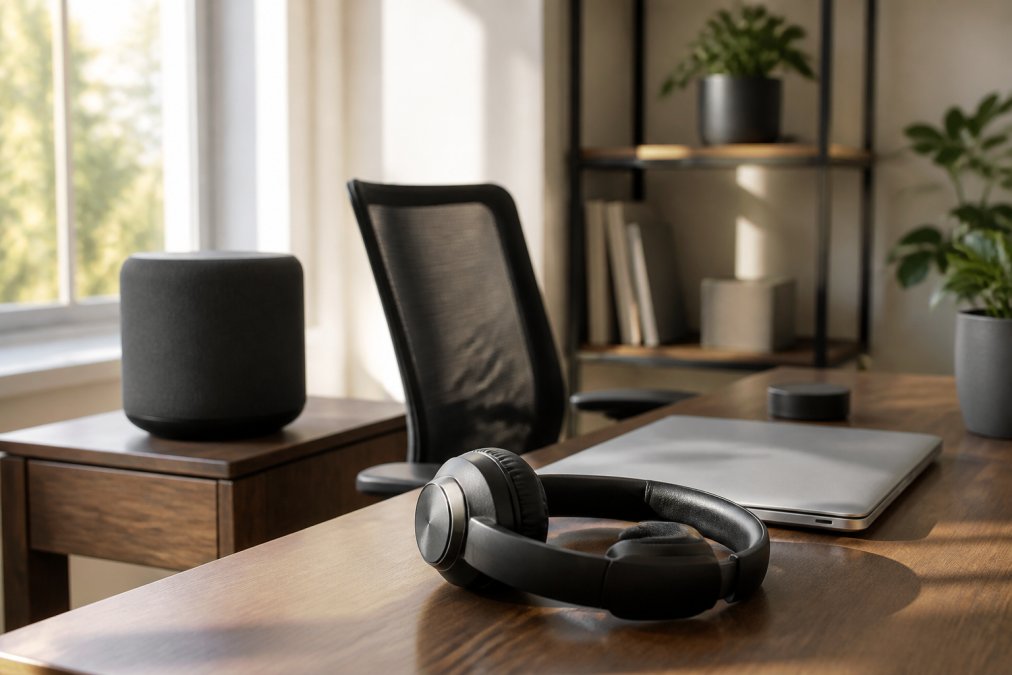
Sonos Era 300: Best Overall for Immersive Sound
The Sonos Era 300 is the most complete wireless audio solution for a dedicated home office. Its 360-degree spatial audio with Dolby Atmos creates a soundstage that fills the room, which makes it feel less like you are sitting in front of a speaker and more like the audio is ambient. Voice control and multi-room streaming via the Sonos app integrate cleanly into an existing smart home setup, and both Bluetooth and Wi-Fi streaming keep your input options open.
What stands out in practice is the clarity across the frequency response. Treble stays crisp during conference calls, while the dynamic range handles music without distortion at higher volumes. The tradeoff is the price point, which sits well above standard Bluetooth speakers, and the desktop footprint is substantial. For a primary workspace where audio quality is non-negotiable, this is the benchmark.
Jabra Evolve2 75: Best Wireless Headset for Work Calls
For professionals who spend hours on video calls, the best wireless headset for work is the Jabra Evolve2 75. The advanced active noise cancellation and multi-microphone array isolate your voice even with a mechanical keyboard clacking nearby, and the microphone boom picks up speech with remarkable directivity. Battery life stretches to 36 hours, which covers nearly two full work weeks on a single charge (jabra.com).
Comfort is where this headset wins long-term. The ergonomic design distributes weight evenly, so you can wear it through back-to-back meetings without the pressure points common in cheaper headsets. It is optimized for major Unified Communications platforms, meaning call quality remains stable across Zoom, Teams, and Webex. The premium pricing reflects that this is a dedicated work tool, not a casual listening device, but for meeting-heavy roles, it pays for itself in reduced call fatigue.
Bowers & Wilkins Zeppelin Pro: Best for Design Enthusiasts
The Bowers & Wilkins Zeppelin Pro proves that a luxury speaker can also serve as a functional office centerpiece. Its sculpted form and premium materials make it the most visually striking option here, and the high-resolution audio streaming supports services like Spotify and Tidal for audiophile-grade playback. Multi-room capability with other Zeppelin units lets you extend the same sonic character throughout your home.
Sound quality is genuinely audiophile-grade, with advanced digital signal processing delivering a balanced signature that flatters both spoken word and complex instrumentation. The catch is the significant investment for an office speaker, and the design may not suit minimalist desks where you want gear to disappear. If your workspace doubles as a design statement, the Zeppelin Pro justifies its cost through build quality and acoustic performance that cheaper speakers cannot match.
Edifier S1000W: Best Versatile Bookshelf Speakers
The Edifier S1000W bridges the gap between traditional hi-fi and modern streaming convenience. These bookshelf speakers offer Wi-Fi and Bluetooth 5.0 connectivity, support Apple AirPlay 2 and Amazon Alexa, and include optical, coaxial, and RCA inputs for wired flexibility. That input variety is rare in wireless speakers and makes the S1000W a future-proof choice if you add a turntable or TV later.
Sound quality is driven by titanium dome tweeters that deliver crisp treble clarity, while the larger cabinet produces bass response that fills a medium-sized office. The main drawback is the desktop footprint; these are proper bookshelf speakers, not compact desk companions. For users who want a traditional speaker setup with modern wireless features, the S1000W offers strong value for the acoustic performance.
Sonos Roam 2: Best Compact Portable Option
The Sonos Roam 2 is the answer for small desks and mobile workdays. Its IP67 waterproof and dustproof rating means it survives the transition from your office desk to a patio or workshop without worry, and the 10-hour battery covers a full workday plus commute listening (sonos.com). Automatic Trueplay tuning adjusts the output to your room's acoustics, which is a subtle but meaningful boost to sound quality in untreated spaces.
Seamless switching between Wi-Fi and Bluetooth means it behaves like a stationary smart speaker at your desk and a standard portable Bluetooth speaker elsewhere. The limitation is bass response; the small driver cannot produce the low-end weight of larger speakers, so music with heavy bass sounds thinner. For a compact, versatile wireless audio option that follows you between work and leisure, the Roam 2 is the best pick.
Plantronics Savi 8220: Best for Multi-Device Connectivity
The Plantronics Savi 8220 solves a problem most wireless headsets ignore: managing multiple communication devices at once. Using DECT technology rather than Bluetooth, it delivers superior wireless range that lets you walk across your home while staying connected to your desk phone, PC, and mobile simultaneously (fcc.gov). The base unit includes a built-in ringer, so you never miss an incoming call even if the headset is off.
Active noise canceling blocks office distractions, and the multi-device connectivity means you can switch from a conference call on your PC to a mobile call without re-pairing. The tradeoff is portability; the base station requirement makes this less flexible than Bluetooth headsets for travel. For professionals who live on the phone and need rock-solid signal stability, the Savi 8220 is the most reliable choice.
Shokz OpenComm2 UC: Best for Situational Awareness
The Shokz OpenComm2 UC takes a different approach with bone conduction technology that keeps your ears open to your environment. Instead of sealing off your ears, it transmits audio through your cheekbones, leaving you aware of doorbells, children, or colleagues while on calls. The DSP noise-canceling boom microphone ensures your voice comes through clearly, and the lightweight titanium frame is comfortable for all-day wear.
The open-ear design is ideal for parents working from home or anyone who needs to stay responsive to their surroundings. Sound quality differs from traditional headphones; bass is less pronounced, and audio can leak at high volumes, so it is not the best choice for immersive music listening. For situational awareness during work calls, the OpenComm2 UC is unmatched in this lineup.
Wireless Audio Comparison Table for Your Workspace
Comparing these options side by side clarifies which wireless audio setup matches your workflow.
| Product | Type | Best For | Key Strength | Key Limitation |
|---|---|---|---|---|
| Sonos Era 300 | Wi-Fi/Bluetooth Speaker | Immersive office audio | Spatial audio, soundstage | High cost, large footprint |
| Jabra Evolve2 75 | Wireless Headset | Video calls | Microphone quality, ANC | Premium work-tool pricing |
| Bowers & Wilkins Zeppelin Pro | Wi-Fi Speaker | Design-focused spaces | Aesthetic, audiophile sound | Significant investment |
| Edifier S1000W | Bookshelf Speakers | Traditional setups | Input versatility | Takes up desk space |
| Sonos Roam 2 | Portable Speaker | Small desks, mobility | Portability, durability | Limited bass response |
| Plantronics Savi 8220 | DECT Headset | Multi-device users | Wireless range, stability | Requires base station |
| Shokz OpenComm2 UC | Bone Conduction Headset | Situational awareness | Open-ear comfort | Different sound signature |
How We Evaluated the Best Wireless Audio Gear
We judged each product on five criteria that matter specifically in a home office context, not just for general listening. Conference call clarity was weighted heavily because microphone quality and voice isolation determine whether your colleagues can understand you. Signal stability matters for uninterrupted calls, and latency is critical for video conferencing where audio lag makes conversation feel unnatural. We also assessed audio fidelity for music playback and the ergonomic fit for long work sessions.
A key differentiator in our evaluation was dual-purpose performance. Many speakers excel at music but fail at voice pickup, while many headsets handle calls but sound flat for music. The products above earned their spots by performing well in both contexts. We also considered the smart home ecosystem integration, since your wireless audio should work with the voice assistant and streaming setup you already own.
Bluetooth Speaker vs Wi-Fi Speaker for Office Use
The Bluetooth speaker vs Wi-Fi speaker for office debate comes down to how you use audio throughout your day. Bluetooth speakers pair directly with your laptop or phone, offer universal compatibility, and work anywhere without a network. Wi-Fi speakers connect through your home network, which enables multi-room streaming, higher-resolution audio, and more stable connections that do not drop when you walk across the room.
For a stationary office setup, Wi-Fi streaming generally wins on audio fidelity and signal stability. Bluetooth remains the better choice if you move your speaker between rooms or take it on the road. Many modern speakers, including the Sonos models above, support both, giving you the flexibility to switch based on your immediate need. The deciding factor is whether your speaker stays on your desk or travels with you.
How to Set Up Wireless Speakers for Home Office Acoustics
Speaker placement affects sound quality more than any cable or codec, and most home offices have poor acoustics. Position your speakers at ear level, roughly equidistant from your listening position, to create a proper soundstage. Avoid placing them directly against walls or in corners, which exaggerates bass response and muddies mid-range frequencies where voices sit.
For conference calls, the microphone array needs a clear path to your voice. Keep the speaker within a few feet of your mouth and away from noisy appliances like air conditioners or mini-fridges. If your office has hard floors and bare walls, adding a rug or acoustic panels reduces echo and improves voice clarity dramatically. Setting up wireless speakers for home office acoustics is less about expensive treatment and more about intentional placement and basic sound absorption.
Which Wireless Audio Setup Should You Pick?
Start by identifying your primary use case, then match it to the right category. If you take more than two hours of calls daily, invest in a dedicated headset like the Jabra Evolve2 75 or Plantronics Savi 8220; your colleagues will hear the difference immediately. If your work involves deep focus with music or white noise, a quality speaker such as the Sonos Era 300 or Edifier S1000W will serve you better than headphones that cause ear fatigue.
For those who split time between a desk and other locations, the Sonos Roam 2 offers the flexibility to move seamlessly between work and leisure. The Shokz OpenComm2 UC suits parents or anyone who needs to stay aware of their surroundings. Budget-conscious buyers should prioritize the categories above over specific models; a mid-range headset outperforms a premium speaker for call-heavy roles, regardless of price.
Conclusion
Building the right wireless audio setup for your home office requires matching the gear to your daily workflow rather than chasing the most impressive specifications. The products reviewed here each solve a specific problem, from immersive sound for focused work to open-ear designs that keep you connected to your environment. Explore our collection to find the setup that fits how you actually work, and upgrade your daily audio experience today.
Frequently Asked Questions
What is the best sound system for a home office?
The best sound system depends on your primary use. For conference calls, a dedicated wireless headset like the Jabra Evolve2 75 offers superior microphone clarity. For music and general audio, a Wi-Fi speaker such as the Sonos Era 300 provides a wider soundstage. Many professionals find a hybrid setup with a headset for calls and a speaker for breaks is ideal.
Bluetooth speaker vs Wi-Fi speaker for office: which is better?
For a stationary home office setup, Wi-Fi speakers are generally better. They offer higher audio fidelity, more stable signal stability, and can be part of a multi-room streaming system. Bluetooth speakers are best for portability or if you frequently switch between different devices. If you are deciding between the two, consider if you need to move the speaker or if it will have a permanent desk footprint.
Do I need a dedicated speaker or a headset for home office calls?
If you take more than a few calls a day, a dedicated headset is a worthwhile investment. Headsets use a microphone array positioned near your mouth, which provides superior conference call clarity and blocks background noise. Speakers can cause echo for the person on the other end. For primarily solo work with occasional calls, a high-quality speaker with good noise cancellation is often sufficient.
How do I set up wireless speakers for my home office to get the best sound?
Place speakers at ear level, angled toward your listening position to improve directivity and treble clarity. Avoid corners, which amplify bass response and cause muddiness. If you use a desk, consider stands to decouple the speaker from the surface. For voice assistant integration, ensure the microphone can hear you clearly, and check for firmware updates to ensure optimal performance and connectivity.